
When to Use BigQuery with Looker Studio: A Complete Guide for Data Analysts
Have you ever watched your Looker Studio report crawl at a snail's pace while loading data? Or perhaps you've hit the dreaded cell limit in Google Sheets just as you were adding that crucial VLOOKUP formula? If these scenarios sound painfully familiar, it might be time to introduce BigQuery into your data stack.
In this guide, we'll explore exactly when BigQuery becomes the right solution for your data challenges and how to efficiently get your data into this powerful warehouse. No fluff, just practical knowledge you can apply immediately.
When Should I Consider Using BigQuery?
BigQuery isn't always necessary, but when you need it, nothing else will do. Let's identify the clear tipping points that signal it's time to make the switch.
When Direct API Connections Are Too Slow
Picture this: Your client needs a dashboard that pulls three months of campaign data across multiple platforms. You set it up perfectly in Looker Studio, but when they open it... they're staring at loading spinners for minutes on end.
This is a classic sign that your direct API connections can't handle the volume of data being requested. Tools like GA4, Klaviyo, and Shopify aren't built primarily for analytics – their APIs have limitations:
GA4 caps at 250,000 rows per request and may sample your data
Klaviyo returns only 100 rows per API response
Shopify limits you to 250 products/orders per request
When your data exceeds these limits, your reports become frustratingly slow or simply break. BigQuery solves this by storing all your data in advance, ready for lightning-fast retrieval.
When Google Sheets Can't Keep Up
Google Sheets is amazingly versatile, but it has its limits:
Hard ceiling of 10 million cells per sheet
Performance degradation with complex formulas
Timeout issues with large datasets
I experienced this firsthand with a client processing 3,000 daily transactions from ClickBank, each with 40-50 data points. Within just 3-4 days, we'd hit Google Sheets' limit, forcing us to maintain multiple sheets with fractured data.
BigQuery has no practical limits for this scale of data and maintains consistent performance regardless of volume.
When You Need Advanced Data Modeling
Sometimes the roadblock isn't volume but complexity. Have you ever found yourself thinking:
"I wish I could use window functions in Looker Studio."
"If only I could merge more than five data sources."
"I need to create a custom attribution model across touchpoints."
These are signs you've outgrown the data modeling capabilities of Looker Studio and Google Sheets. BigQuery offers:
Hundreds of SQL functions versus Looker Studio's limited set
Unlimited table joins (not just 5 sources)
Support for UNION operations, window functions, and complex mathematical operations
Machine learning capabilities without requiring a data science degree
For the Fastest Possible Report Load Times
Nothing impresses clients more than dashboards that load instantly. If you've got a Google Sheets-based pipeline that works but loads slowly, migrating it to BigQuery can dramatically improve performance.
The secret is BigQuery's BI Engine, which caches your data in memory, delivering sub-second response times and often faster than even small Google Sheets connections.
To Own and Retain Your Data
Do you truly own your marketing data if it only exists within Facebook's or Google's platforms? What happens when those platforms change their data retention policies?
BigQuery gives you true data ownership:
Store data for as long as you want (no 14-month GA4 limitation)
Choose where your data physically resides (EU data centers for GDPR compliance, for instance)
Access your historical data anytime without sampling or throttling
For Agencies: To Protect Your Data Modeling IP
This point is especially important for agencies and consultants. When you share a Looker Studio report with edit access, you're giving away not just the visualization but also your entire transformation logic; your intellectual property.
With BigQuery, you can create a business model where:
You own the BigQuery project
Client data comes into your project
Your proprietary SQL transformations (your "secret sauce") process that data
Clients get access to the final visualization but not the underlying logic
This creates a stronger value proposition and competitive advantage for your agency. As one of my agency clients put it: "We sell the insights, not our methodology."
Importing Data into BigQuery
Once you've decided BigQuery is right for your needs, the next question is: how do you get your data in there? Unlike Google Sheets, you can't simply copy-paste. Let's explore your options.
Free Native Connectors: The Google Ecosystem
The easiest place to start is with Google's own products, which offer free, built-in BigQuery integrations:
Google Analytics 4: Free daily and streaming exports to BigQuery (a feature previously exclusive to GA360 customers paying $150K+ per year)
Google Ads: Free data transfer service with comprehensive data
Google Search Console: Free data transfer that brings all your SEO data into BigQuery
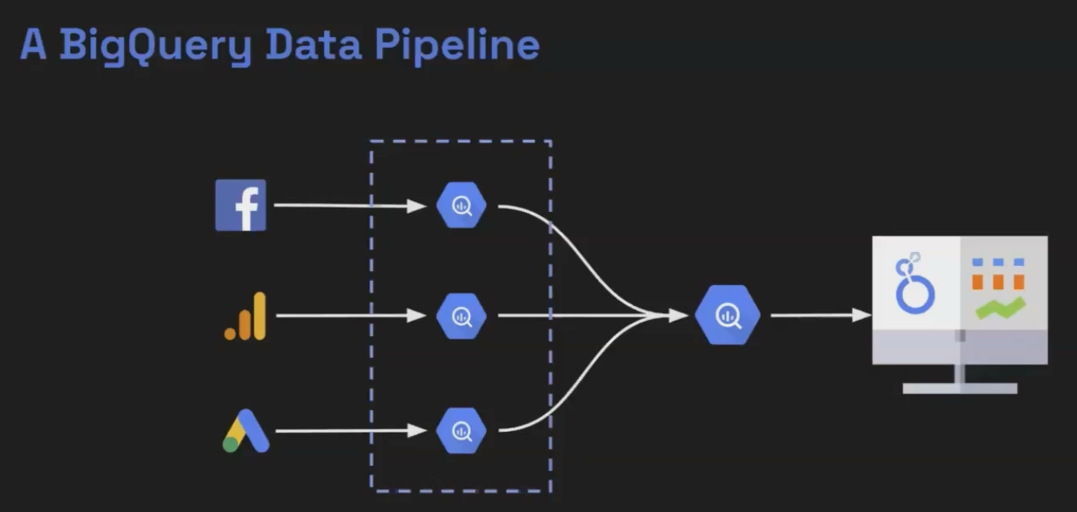
Setting these up typically takes just a few clicks in each platform's admin section.
The Google Sheets Bridge: A Universal Connector
Here's a powerful hack: BigQuery has a seamless integration with Google Sheets. This means any data you can get into Sheets, you can get into BigQuery and making Google Sheets an excellent intermediary.
Many tools have affordable Sheets connectors but expensive BigQuery ones. Use the Sheets connector, then link the Sheet to BigQuery for a fraction of the cost.
Third-Party ETL Tools: The Professional Approach
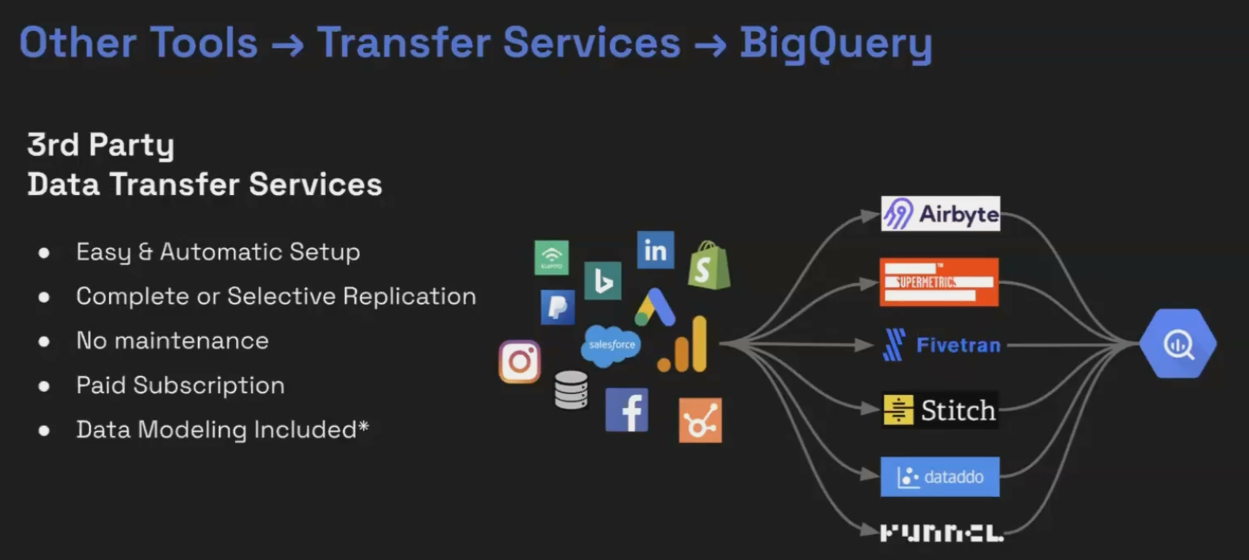
For enterprise-grade data pipelines, third-party ETL (Extract, Transform, Load) tools offer the most reliable solution:
Funnel.io: Specializes in marketing data
Fivetran: Offers comprehensive database and SaaS connectors
Airbyte: Open-source alternative with growing connector library
Supermetrics: Familiar to many marketers with its Sheets integration
When evaluating these tools, consider these key differences:
Complete vs. Selective Replication: Complete replication automatically syncs all available data. Selective requires you to specify exactly which data points you want.
Transformation Capabilities: Some tools can perform basic transformations before loading data into BigQuery.
Update Frequency: How often will the data refresh? Hourly, daily, or in real-time?
Custom Solutions: The Developer Approach
If you can't find a pre-built connector for your data source, you can build your own using Google Cloud Functions or similar technologies. This requires some programming knowledge but gives you complete control over your data pipeline.
Getting Started: A Practical Approach
For most businesses new to BigQuery, I recommend this phased approach:
Start with GA4: It's free, automatic, and gives you immediate access to valuable data.
Add Google Ads and Search Console: These free connectors complement your analytics data.
Experiment with Google Sheets: For smaller data sources, use the Sheets bridge method.
Evaluate ETL tools: Once you're comfortable with BigQuery, consider a professional ETL solution for comprehensive data integration.
Frequently Asked Questions (FAQs)
Do you use Facebook ad data transfer? I heard bad reviews.
The native Facebook to BigQuery transfer has limitations. For serious Facebook analytics, third-party ETL tools like Funnel.io or Supermetrics generally provide more reliable and comprehensive data pipelines.
What are the best practices for writing efficient SQL queries in BigQuery?
For cost efficiency: 1) Only select the columns you need (avoid SELECT *), 2) Filter data early in your query, 3) Use partitioned and clustered tables, and 4) Preview your query cost before running it (BigQuery shows you this).
When you extract results to Looker Studio from BigQuery, does the report auto-update when there's a change in data?
Yes, Looker Studio will automatically reflect changes in your BigQuery data according to your data freshness settings. If set to "1 hour," Looker Studio will check for new data hourly.
How does the agency ownership model for data modeling actually work? Isn't it moving BigQuery processing costs to the agency?
Yes, the agency absorbs the processing costs, but these are typically modest and can be built into your service pricing. The key is transparency with clients. Make it clear that while their data belongs to them, your processing methodology remains your intellectual property.
If a previous agency set up BigQuery under their account and not the client's, how easy is it to transfer?
This becomes primarily a legal question rather than a technical one. The previous agency owns that project, and you'll need to work with them to either transfer ownership or extract the data and recreate it in a new project.
The shift to BigQuery represents more than just technical advancement. It's about taking ownership of your data story. When your data lives in a warehouse you control, you gain the freedom to analyze it on your terms, unconstrained by the limitations of third-party platforms.
Whether you're hitting volume limits, seeking better performance, or looking to protect your analytical IP, BigQuery offers a scalable solution that grows with your needs. The best part? You can start exploring today with the generous free tier, making the barrier to entry lower than ever.
Remember: BigQuery isn't about replacing your existing tools but enhancing them. Looker Studio remains your visualization layer, while BigQuery becomes the powerful engine behind it; delivering the speed, scale, and sophistication your data deserves.
Note:
This post is based on a subject covered in the Looker Studio Masterclass Program. To learn more about Looker Studio Masterclass, click here.
