
BigQuery for Looker Studio: Breaking Through Data Limitations & Scaling Analytics
Are you hitting the ceiling with your current data analysis workflow? If your reports are running slow, your Google Sheets are crashing, or you're tired of fighting API limitations, it might be time to level up your data game with Google BigQuery.
Today, we're diving into the first essential lesson of BigQuery for Looker Studio users. We'll explore why your current setup might be holding you back, what BigQuery actually is (beyond the buzzwords), and how it can revolutionize your data workflow. Whether you're a seasoned analyst, a marketing agency, or a data-driven business owner, this guide will show you why BigQuery might be your next power move.
Let's break down what we'll cover:
The limitations that might be frustrating you right now
What BigQuery is and why it matters
How it compares to your current tools
When it makes sense to make the switch
Getting started with your first project
Ready to transform how you work with data? Let's jump in!
The Breaking Point: Limitations of Your Current Data Stack
If you're connecting Looker Studio directly to your data sources or using Google Sheets as your transformation layer, you're likely hitting some painful roadblocks. Let's identify these common bottlenecks.
Speed and Volume: When Your Reports Crawl to a Halt
Picture this: Your client needs a year-long analysis of their e-commerce performance across multiple products and marketing channels. You build a beautiful Looker Studio dashboard, but when they open it... they're staring at loading spinners for minutes on end. Sound familiar?
The Problem: API Limitations
Every visualization in your report requires a data request to the source platform's API. These APIs simply weren't built for analytical workloads:
Google Analytics 4 caps responses at 250,000 rows and implements sampling when data volumes are high
Klaviyo limits you to just 100 rows per request, forcing multiple round-trips for larger datasets
Shopify restricts you to 250 products or orders per API call
Even worse, these tools often perform complex calculations (like marketing attribution) on their servers before responding, adding seconds or minutes to your load times.
When Google Sheets Can't Keep Up
Many of us solve these API limitations by building data pipelines through Google Sheets. It works great for a while, but then:
You hit the 10 million cell limit
Your VLOOKUPs and REGEX formulas take forever to calculate
The sheet randomly times out or crashes
This was my personal breaking point. One client had about 3,000 transactions daily with 40-50 data points each. Within just a week, we'd exceed Google Sheets' capacity. Our pipeline would break, and we'd be back to square one.
The Data Modeling Glass Ceiling
Have you ever searched "how to do X in Looker Studio" only to find forum replies saying "it's not possible"? That's the data modeling ceiling.
Looker Studio and Google Sheets are incredible tools, but they have inherent limitations:
No window functions for time-based comparisons
No UNION operations to combine similar datasets
Data blending limited to just 5 sources
A finite set of functions compared to a full SQL environment
The Invisible Cost: Lost Data Ownership
Here's something many don't consider until it's too late: you may not truly own your data.
When you track data in Google Analytics, Facebook Ads, or your HR software, that data lives in their systems under their rules. They decide:
How long they'll store it (often 14-26 months)
How you can access it (with rate limits and sampling)
What you can do with it (export limitations)
I once worked with a client who had invested heavily in an enterprise HR system. When they needed to analyze attendance patterns across departments, the vendor required them to fax a written request just to export their own data! This isn't uncommon.
The Agency's Dilemma: Giving Away Your Secret Sauce
For agencies and consultants, there's one more painful limitation: when you share a Looker Studio report with edit access, you're essentially giving away your intellectual property.
All your formula logic, your custom calculations, your data cleansing rules (everything that makes your analysis valuable and unique) is embedded right in the report for the client to see and copy. Your "secret sauce" is handed over with every deliverable.
Caption: The hidden bottlenecks in a typical data workflow without BigQuery
What is BigQuery? The Google-Scale Data Warehouse
Now that we've identified the pain points, let's talk about the solution. BigQuery is Google's enterprise data warehouse offering within the Google Cloud Platform (GCP). But what does that actually mean for you?
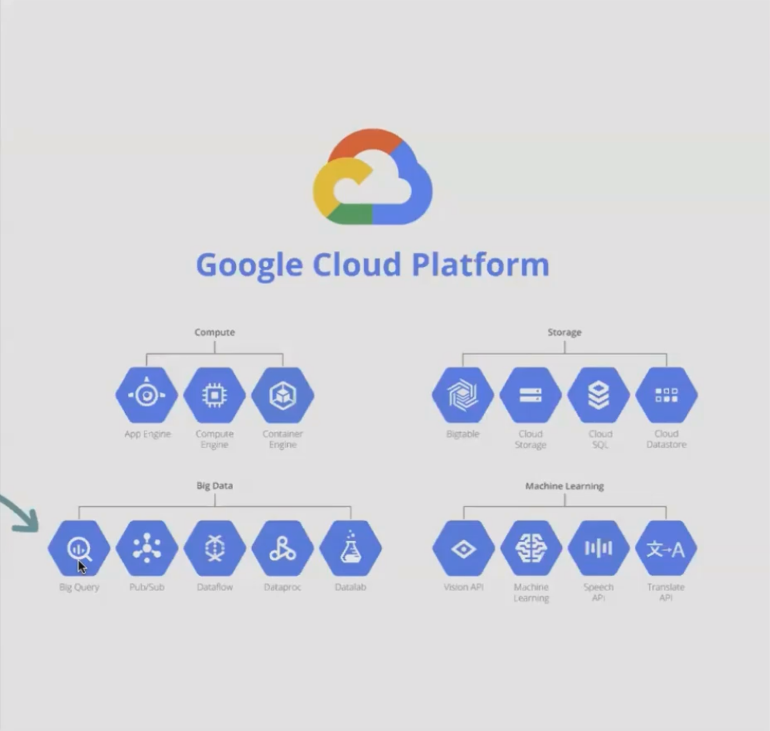
The Origin Story: Google's Infrastructure, Now Available to You
Here's a simple way to think about it: Google built massive data centers with incredible computing power to run its own operations (Search, Ads, YouTube, etc.). BigQuery essentially lets you rent a piece of that infrastructure on a pay-as-you-go basis.
BigQuery in Plain English
Strip away the jargon, and BigQuery is:
A place to store data of virtually any size (from megabytes to petabytes)
A massively parallel query engine that can analyze that data incredibly quickly
A fully managed service with no servers for you to maintain
A cost-efficient system where you only pay for what you use
Key Features That Make BigQuery Special
1. True Scalability
There's a fundamental difference between "can handle a lot of data" and "virtually unlimited." BigQuery falls into the latter category. I've personally worked with single tables over 120 terabytes in size; data that would be impossible to process in traditional tools.
2. Blazing Speed Through Massive Parallelization
BigQuery achieves its speed by spreading your query across hundreds or thousands of virtual CPUs simultaneously. When I ran a query on a 19-million-row dataset (with 60 columns), BigQuery completed it in under 2 minutes by using what would have been 29 minutes of processing time on a single CPU.
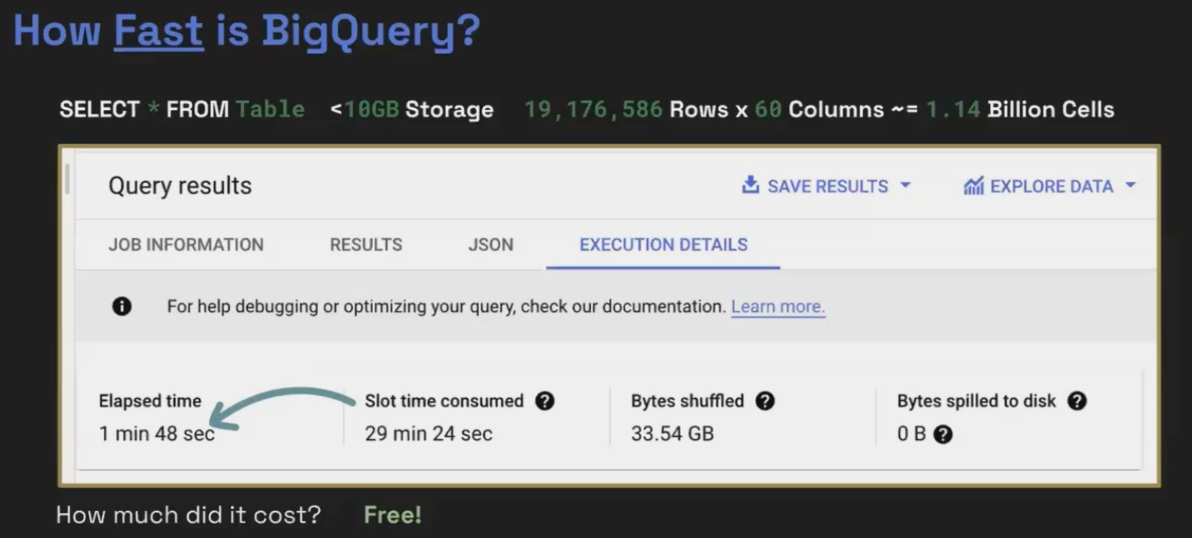
For smaller datasets, results often come back in sub-second time.
3. Native Integration with Looker Studio
The connection between BigQuery and Looker Studio is seamless, fast, and free. One click and your data is available for visualization.
4. SQL-Based Analysis with Advanced Options
BigQuery uses standard SQL, which has been the language of data for 50+ years. Beyond that, it offers:
BigQuery ML for easy machine learning without becoming a data scientist
Python support for more advanced processing
Data workflows for orchestrating complex pipelines
5. Generous Free Tier
Google offers:
10GB of storage free each month
1TB of query processing free each month
Free connections to Looker Studio
For many small businesses or personal projects, you may never leave the free tier.
How Does BigQuery Compare to What You're Using Now?
Let's compare the typical data stack to one using BigQuery:
Current Stack:
Data sits in source platforms (GA4, Shopify, Facebook, etc.)
You either connect directly (slow) or extract to Google Sheets (limited)
You transform in Sheets (limited functions, low ceiling)
You visualize in Looker Studio (sharing your logic)
BigQuery Stack:
Data from all sources is copied to BigQuery (your warehouse)
You transform with powerful SQL (unlimited possibilities)
You connect clean, ready-to-visualize data to Looker Studio
Your proprietary logic stays safe in BigQuery
The result? Faster reports, more powerful analysis, no volume limitations, and protected intellectual property.
Is BigQuery Expensive?
The cloud-scale power might sound expensive, but BigQuery's pricing is surprisingly accessible:
Storage: ~$0.02 per GB per month for active storage (half price after 90 days)
Queries: ~$6.25 per TB of data processed by your queries
For context, 90 days of GA4 data for a moderate e-commerce site is typically only about 4GB. That's less than 10 cents per month in storage costs.
And remember, your first 10GB of storage and 1TB of queries each month are completely free.
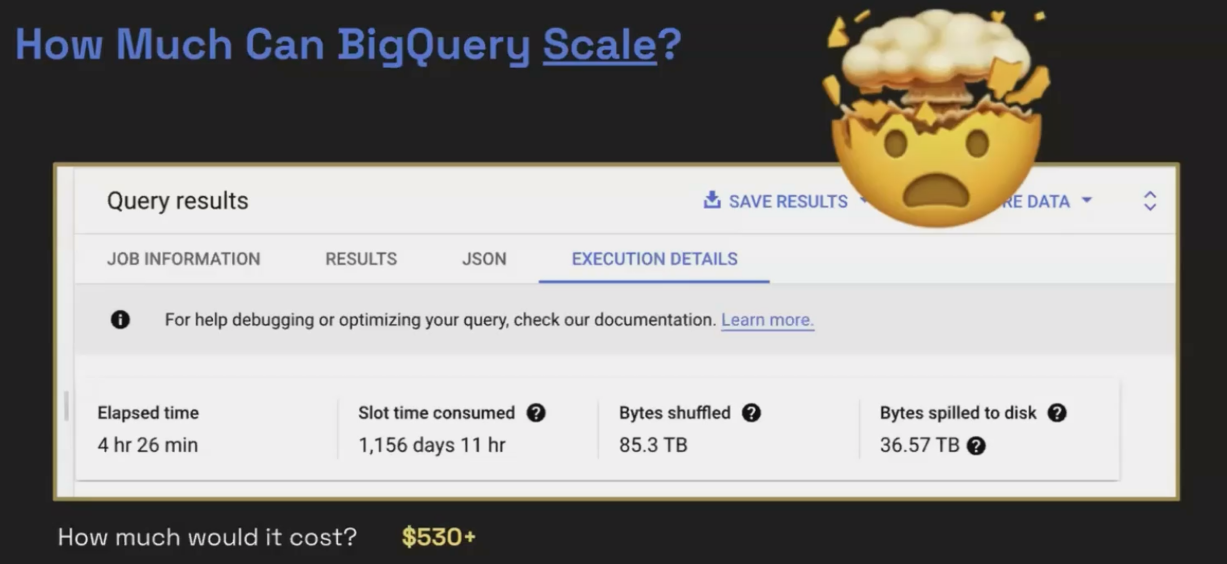
The BigQuery architecture offers seamless scaling from small datasets to massive analytics workloads
Frequently Asked Questions (FAQs)
What are the best practices for writing cost-efficient SQL queries in BigQuery?
Focus on three key practices to keep costs down:
Only SELECT the columns you actually need, not all columns with SELECT *
Apply filters early in your query to reduce the amount of data processed
For large tables, use partitioning and clustering to allow BigQuery to scan only the relevant portions of your data
If a previous agency set up our BigQuery project, how can we transfer ownership?
Unlike Looker Studio reports which can be easily transferred, BigQuery projects are owned by the Google Cloud organization that created them. You'll need to work directly with the previous agency to transfer the project to your organization. This is more of a contractual discussion than a technical one.
Does using GA4's BigQuery export make Google Tag Manager less important?
Not at all! They serve completely different purposes in your data stack. Google Tag Manager is for collecting data and sending it to platforms like GA4. BigQuery is for storing and analyzing that data after it's been collected. You still need GTM (or an alternative) to get data into GA4 in the first place.
When I connect Looker Studio to BigQuery, does the report automatically update when the data changes?
Yes! The connection works just like connecting to a Google Sheet. Looker Studio will fetch fresh data from BigQuery according to your "Data freshness" settings in the data source configuration.
As an agency, how can I protect my data modeling IP while still delivering value to clients?
Consider the "agency-owned" BigQuery project model. In this approach:
You create and own the BigQuery project
You import the client's data (with their permission)
You transform it using your proprietary SQL logic
You connect only the final, analyzed tables to Looker Studio for the client
The client gets their data and insights, but your transformation logic remains your IP
The key is transparency from the beginning about this arrangement.
Is BigQuery Right for Your Next Project?
BigQuery isn't the right solution for every project. Consider making the switch when:
Your reports are uncomfortably slow when connected to APIs
Your Google Sheets are hitting volume limits or performance issues
You need advanced data modeling capabilities (window functions, complex joins)
You want to own and retain your data long-term
You need to protect your data modeling intellectual property
For many small, simple dashboards with limited data needs, your current stack might be perfectly adequate. BigQuery shines when you're pushing the boundaries of what's possible with direct connections and spreadsheets.
Note:
This post is based on a subject covered in the Looker Studio Masterclass Program. To learn more about Looker Studio Masterclass, click here.
