
Looker Studio Pro vs Free: A Complete Guide to Pricing and Features
Have you ever wondered what exactly you're getting when you upgrade to Looker Studio Pro? As a data visualization specialist who's spent countless hours in both free and Pro environments, I'm here to clear up the confusion and help you decide if that monthly fee is actually worth it for your situation.
What Exactly Is Looker Studio Pro?
Looker Studio Pro is the premium version of Google's data visualization and reporting tool. While the free version has gained massive popularity among marketers and analysts worldwide, the Pro version offers additional features designed specifically for teams and organizations that need more control over their data assets.
But before we dive into the specifics, let's address the elephant in the room: the price.
The Real Pricing of Looker Studio Pro in 2025
Let me start by debunking some common pricing myths. I've heard people claim that Looker Studio Pro costs as little as $1 per year or as much as $5,000 per user. Neither is accurate!
The actual cost is $9 per Pro user, per project, per month.
For most organizations with a single project, this simplifies to $9 per user per month. For my own business, I maintain two Pro subscriptions (one for client work and one for training), which amounts to $18 monthly.
This pricing model represents a significant shift from the previous "contact sales" approach. Google has made Looker Studio Pro entirely self-serve, with transparent pricing available through their documentation.
Key Differences: What You Actually Get for Your $9
When you upgrade to Looker Studio Pro, you're not getting a dramatically different interface or tool. In fact, the report creation experience remains identical. Here's what you actually get:
1. Organizational Asset Ownership
This is perhaps the most valuable difference for businesses. In the free version:
Reports and data sources belong to individual users
If an employee leaves, their assets go with them
Transferring ownership is a manual process
With Pro:
Assets belong to your organization
Reports remain accessible even when team members leave
Everything links to your Google Cloud organization
For companies investing significant resources in dashboard development, this feature alone can justify the cost.
2. Folders and Team Workspaces
Free Looker Studio offers basically no organizational structure beyond naming conventions. If you've ever struggled to find reports among hundreds of assets, you'll appreciate Pro's:
Team workspaces for different departments or clients
Folder hierarchies with unlimited sub-folders
Ability to move assets between folders
Permission management at the workspace level
This organizational capability becomes increasingly valuable as your report library grows.
3. Enhanced Report Delivery
The free version allows for basic scheduled email delivery of reports. Pro expands this with:
Up to 20 different schedules per report
Each schedule can have up to 50 email recipients
Custom email subjects and messages for each schedule
Google Chat integration
This means you can send different versions of the same report to various stakeholders on different schedules; all from a single source.
4. Additional Pro Features
Beyond the three core differences above, Pro also offers:
Chart-based alerts (email notifications when metrics hit thresholds)
Gemini AI assistant integration
A dedicated mobile app
Access to Google technical support (with a Google Cloud support plan)
What Looker Studio Pro Is NOT
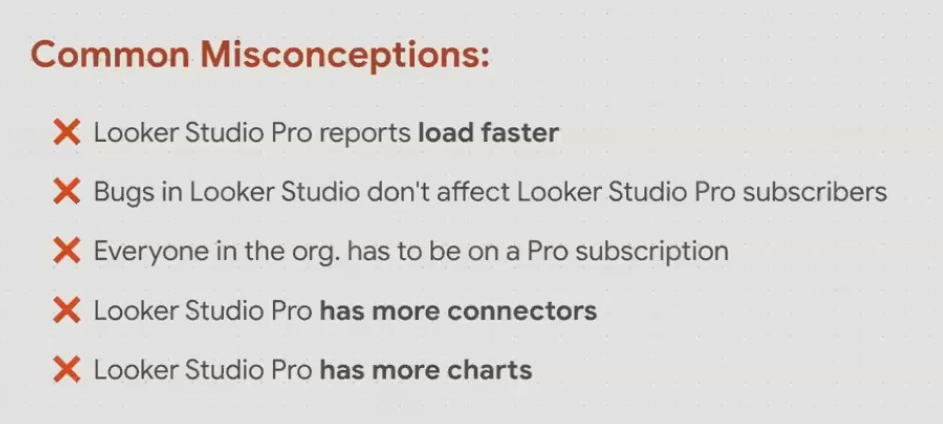
Understanding what Pro doesn't provide is equally important. Let me address some common misconceptions:
Misconception 1: "Pro will make my reports faster"
Performance issues in Looker Studio typically stem from complex calculations, large datasets, or slow data sources and not your subscription level. Upgrading to Pro won't magically speed up sluggish reports.
Misconception 2: "Pro has fewer bugs"
I've actually experienced more interface issues with Pro than with the free version at times! The underlying technology is identical, so bugs affect both versions similarly.
Misconception 3: "Everyone on my team needs Pro"
This is a big one. Only users who need to:
Create and manage team workspaces
Organize assets in folders
Set up advanced delivery schedules
Configure chart alerts
...need Pro licenses. Viewers and even editors of Pro reports don't need to pay for Pro.
Misconception 4: "Pro has more connectors and chart types"
Both versions offer identical data connection options and visualization types. The difference is in management features, not creative capabilities.
Who Should Upgrade to Looker Studio Pro?
Based on my experience working with organizations of all sizes, here's who benefits most from Pro:
Ideal for Pro Upgrade:
Medium to large organizations with multiple dashboard creators
Agencies managing client reporting at scale
Teams where employee turnover is a concern
Organizations with strict governance requirements
Anyone managing 50+ reports across multiple initiatives
Probably Fine with Free:
Individual freelancers
Small teams with minimal turnover
Organizations with simple reporting needs
Those just getting started with data visualization
For many organizations, having just one or two Pro users who manage the team's workspaces and folder structure is sufficient. Everyone else can use the free version to view, edit, and even create reports within those organized spaces.
Frequently Asked Questions (FAQs)
If I upgrade my dashboard to Pro, will people outside my organization lose access?
No, existing access permissions remain intact when you move a report to Pro. External users can still view reports with the same link they had before.
Do I need to upgrade all my existing reports to Pro?
Only if you want Pro features for those specific reports. You can selectively move your most important assets to team workspaces while leaving others as personal assets.
How do I upgrade to Looker Studio Pro?
You can self-serve through the Looker Studio product documentation. The process links your Looker Studio account to a Google Cloud project and enables billing.
Can I try Pro before committing?
Unfortunately, Google doesn't currently offer a free trial of Looker Studio Pro. However, the $9 monthly fee is low enough that you could test it for a month with minimal investment.
For individuals and small teams with straightforward reporting needs, the free version of Looker Studio remains a phenomenal value that's hard to beat.
For teams managing numerous reports with multiple stakeholders, the organizational capabilities and ownership controls of Pro can save countless hours and prevent serious headaches, especially when team members transition.
Rather than thinking of Pro as "better" than free, consider it as addressing a specific set of organizational needs. If those needs align with your situation, $9 per month is a small price to pay for the peace of mind and efficiency gains.
Note:
This post is based on a subject covered in the Looker Studio Masterclass Program. To learn more about Looker Studio Masterclass, click here.
