
Looker Studio Data Connectors Guide: Live vs. Warehoused for Optimal Performance
As your data visualization needs grow more sophisticated, understanding the underlying mechanics of how Looker Studio connects to your data becomes increasingly important. In this deep dive, we'll explore the critical distinction between Live and Warehoused connectors – a fundamental concept that can dramatically impact the performance, reliability, and capabilities of your Looker Studio dashboards.
Why Data Connectors Matter
Before we jump into the specifics, let's establish why this matters. Data connectors are the bridges between your raw data and your beautiful visualizations. They determine how quickly your reports load, how current your data is, and what transformations are possible. Choosing the right connector type for your specific use case can be the difference between a dashboard that delights and one that frustrates.
Live Connectors: The Direct Connection
Live connectors establish a real-time link between Looker Studio and your data source each time a user views your report.
How Live Connectors Work
When someone opens a Looker Studio report powered by a live connector, a fascinating sequence unfolds:
The report begins loading a chart or table
Looker Studio signals the connector that it needs specific dimensions and metrics
The connector makes an API request to the underlying data source (like Google Analytics 4)
The data source returns the requested data through the API
The connector delivers this data to Looker Studio
Looker Studio renders the visualization with the fresh data
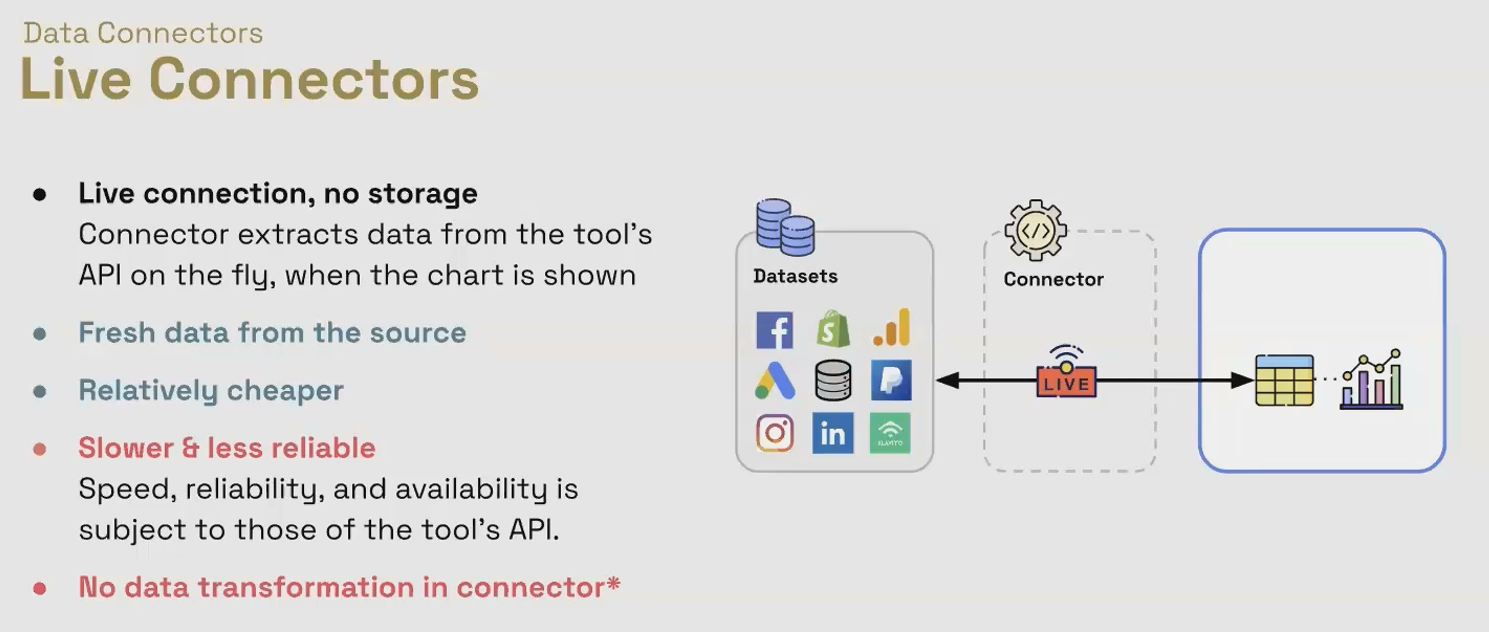
This happens for each component on your report, each time the report loads.
Popular Live Connectors
Google Analytics 4
Google Sheets
Google Ads
Facebook Ads (via some partner connectors)
Many other API-based integrations
Advantages of Live Connectors
Always Fresh Data
Live connectors deliver the most current information available in your source platform. If your sales team just closed a major deal and updated the CRM, that data can appear in your Looker Studio report immediately (assuming your source system makes it available in real-time).
Lower Cost
Google-native connectors are free to use, and partner connectors using the live approach tend to be more affordable since they don't need to maintain a data warehouse infrastructure behind the scenes.
Simple Setup
Live connectors typically require minimal configuration – you authenticate with the source system, select your data, and you're ready to visualize.
Limitations of Live Connectors
Performance Constraints
Live connectors are only as fast and reliable as the API they connect to. If your source system has a slow API or is experiencing downtime, your Looker Studio reports will suffer.
API Quotas and Rate Limits
Most APIs impose limits on how many requests you can make in a given timeframe. With a popular dashboard viewed by many people, you might hit these limits, causing reports to fail.
Limited Data Transformation
Since data is being pulled on demand, there's little opportunity for complex transformations. You're generally limited to the calculated fields available within Looker Studio itself.
💡 Pro Tip: Live connectors are ideal for scenarios where data freshness is critical and your data source has a robust, reliable API with generous quotas.
Warehoused Connectors: The Performance Powerhouse
Warehoused connectors take a fundamentally different approach to data access.
How Warehoused Connectors Work
Instead of fetching data on demand, warehoused connectors:
Extract data from your source platforms at scheduled intervals (hourly, daily, etc.)
Store this data in their own optimized data warehouse
Process and transform the data as needed
Serve this pre-processed data to Looker Studio when requested
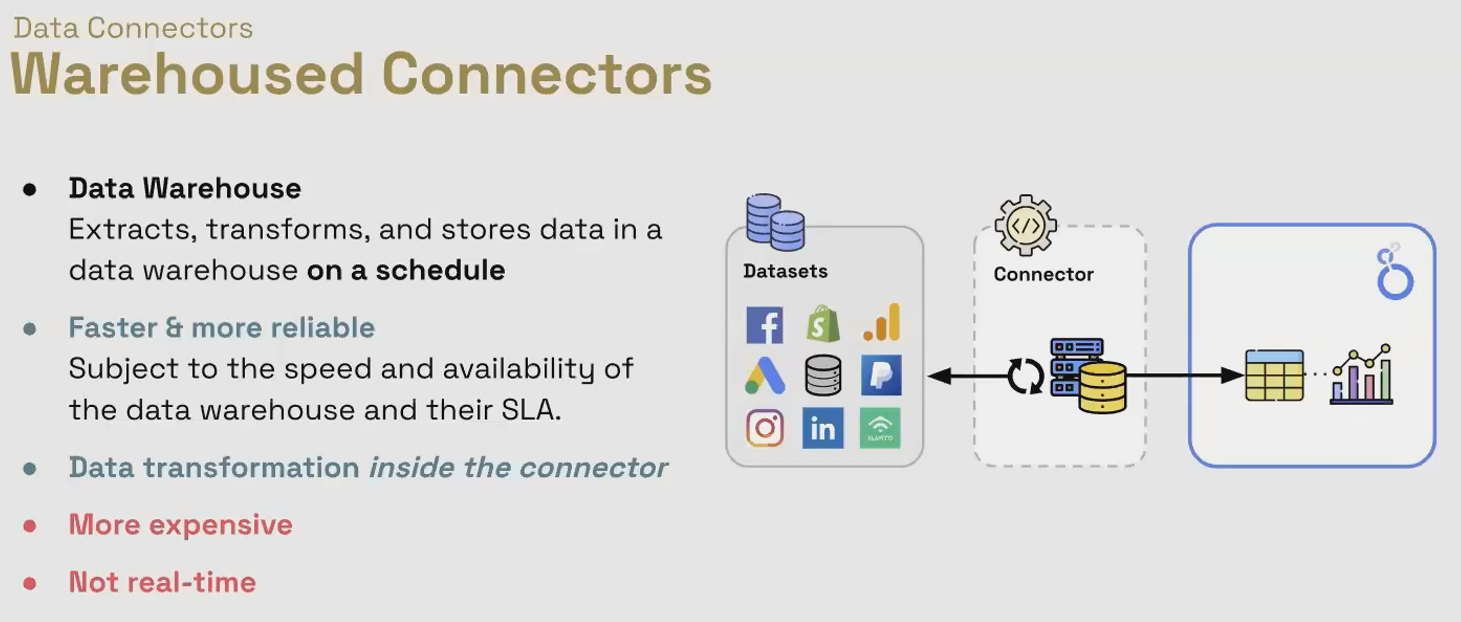
This approach creates a layer of separation between your source system and your reports.
Popular Warehoused Connectors
Supermetrics Data Warehouse
Funnel.ioCheck Domain?
Windsor.aiCheck Domain?
Many enterprise-grade partner connectors
Advantages of Warehoused Connectors
Superior Performance and Reliability
Since data is served from a dedicated, high-performance warehouse optimized for analytics queries, reports load significantly faster. The warehouse environment typically offers better uptime and more consistent performance than connecting directly to various APIs.
Advanced Data Transformation
The warehousing step allows for powerful data processing before it reaches Looker Studio. You can merge data from multiple sources, perform complex calculations, create custom metrics, and standardize naming conventions across platforms.
No API Limitations
Once data is in the warehouse, you're no longer constrained by the API limits of your original data source. This is particularly valuable for high-traffic dashboards or when working with APIs that have strict rate limitations.
Limitations of Warehoused Connectors
Higher Cost
Maintaining a data warehouse requires infrastructure, which means warehoused connectors typically come with a higher price tag. The cost usually scales based on data volume and refresh frequency.
Data Latency
Your data is only as fresh as your last extraction. If you're running hourly extractions, your dashboard could be showing data that's up to an hour old. For some use cases, this is perfectly acceptable, but for others (like real-time monitoring), it could be problematic.
More Complex Setup
Warehoused connectors often require more configuration to set up extraction schedules, transformation rules, and data mapping.
💡 Pro Tip: Warehoused connectors shine when you need to blend data from multiple sources, require complex transformations, or need highly reliable, fast-loading dashboards for many viewers.
Making the Right Choice for Your Use Case
The decision between live and warehoused connectors should be guided by your specific requirements:
Choose Live Connectors When:
Real-time data is absolutely essential
Your data volume is relatively small
You're working with limited budget
Your source system has a stable, reliable API
You need a simple setup with minimal maintenance
Choose Warehoused Connectors When:
Report performance and reliability are top priorities
You need to blend data from multiple sources
Your reports have many viewers (high query volume)
You require complex data transformations
Your source APIs have strict rate limits
Budget allows for a more robust solution
The Hybrid Approach
Many sophisticated reporting setups use both approaches:
Live connectors for real-time monitoring dashboards where freshness is critical
Warehoused connectors for complex analytical reports that blend multiple data sources
Frequently Asked Questions (FAQs)
Can I convert a live connector to a warehoused connector in Looker Studio?
No, this isn't a setting you can toggle. You would need to connect to a different data source that uses the warehoused approach.
Do warehoused connectors support all the same data sources as live connectors?
Not necessarily. Check with each warehoused connector provider for their supported integrations.
How can I tell if a partner connector is live or warehoused?
Check the provider's documentation or contact their support. Most providers clearly indicate their approach and offer details about refresh schedules for warehoused connectors.
If I have a high-traffic dashboard, which type of connector should I use?
For high-traffic dashboards, warehoused connectors typically provide better performance and reliability, especially if many users are viewing the same data simultaneously.
What happens if I exceed the API quota with a live connector?
Your reports will typically show an error message and fail to load data until the quota resets (usually daily).
Understanding the distinction between live and warehoused connectors is just the beginning of mastering Looker Studio's data capabilities. By selecting the right connector type for your specific use case, you can build reports that are not only visually impressive but also performant, reliable, and perfectly aligned with your data freshness needs.
In our next post, we'll explore advanced techniques for optimizing data source configuration in Looker Studio to maximize performance while minimizing costs. Stay tuned!
Note:
This post is based on a subject covered in the Looker Studio Masterclass Program. To learn more about Looker Studio Masterclass, click here.
